This document provides instructions on how the user interface, key design elements, and functional requirements for a Cookie Banner and Cookie Preference Center are to be implemented on dlz.com for U.S. website visitors only to address potential cookie-related litigation risk. These Instructions are intended to be provided to the appropriate DLZ team implementing the Instructions within the cookie manager.
These Instructions assume an explicit opt-in framework, in which all cookies, pixels, beacons, APIs, and other similar technologies, except for Always Active Cookies (defined below), are OFF by default until the user accepts them.
These Instructions were prepared with the understanding that DLZ uses CookieYes as its cookie manager vendor as of the last updated date of these Instructions. However, these Instructions are not tailored to CookieYes’ available settings or specifications and these Instructions make certain assumptions about CookieYes’ capabilities. If any Instructions cannot be implemented using CookieYes, DLZ may need to seek a different vendor with the necessary capabilities.
1. Cookie Scanning
CookieYes, or any similar cookie management tool, should include a cookie scanning feature. This scanning tool detects cookies on the website and automatically categorizes the cookies into Cookie Categories that correlate to the user’s Cookie Preference Center experience. The scanning feature should be set to scan the website at least monthly. Some cookie managers may not detect all relevant online tracking technologies; for example, they may not identify certain tags, pixels, APIs, and JavaScript. A designated employee should be instructed to manually review these scans to ensure that the scanning is accurate, and to categorize the cookies into their appropriate Cookie Category.
2. Cookie Categorization
After a cookie scan, the cookie scanning tool automatically categorizes identified cookies into Cookie Categories. Cookie Categories are displayed to the end user in their Cookie Preference Center. Cookie Categories, and their descriptions, are customizable, and should be set as follows:
Cookie Category | Description |
Always Active Cookies | These Cookies are always active, and cannot be disabled through this website’s cookie preference center. We use these Cookies for various purposes, such as providing functionality necessary for services you request, security, fraud prevention, maintaining your cookie preferences, and complying with applicable law. |
Performance Cookies | These Cookies enhance the website’s performance, such as improvements to latency, page loading, and directing other Cookies’ load times. Without these Cookies, your experience on the website may be interrupted, slower, or inefficient. Note that if Advertising Cookies are enabled, they may interact with Performance Cookies to improve advertising. |
Functional Cookies | These Cookies support the functionality of certain website features, such as site searches or video media players. Without these Cookies, your experience on the website may be interrupted and certain content or portions of the website may not render or be accessible. Note that if Advertising Cookies are enabled, they may interact with Functional Cookies to improve advertising. |
Analytics Cookies | These Cookies support analytics, such as measurements related to how users navigate and interact with the website. Note that if Advertising Cookies are enabled, they may interact with Analytics Cookies to improve advertising. |
Advertising Cookies | These Cookies facilitate advertising, including targeted advertising, across the internet and over time. For example, if you show interest in products shown on this website, you may receive an advertisement for those same products on a different online service. |
Social Media (Functional and Advertising) Cookies | These Cookies relate to social media online services, such as those that you may have a profile with. These Cookies may enable you to share content from our website to your social media profile, as well as deliver ads to you on the social media platform. Without these Cookies, certain social media functions may not function, appear, or work on the website. |
The following are instructions on how to categorize cookies within the cookie management tool to ensure that the appropriate cookies are subject to the user’s preferences:
- After a scan, the cookie management tool may automatically categorize cookies and may also create a category or categorize cookies as “Unknown” or “Uncategorized”. Any cookies automatically categorized by the cookie management tool as “Unknown” must be manually categorized.
- The “Unknown” category should not display to the website visitor in the Cookie Preference Center.
- After every scan, every cookie, including newly added cookies, should be manually reviewed to ensure they are categorized correctly.
- Ensure that the cookies are categorized per the chart below. If there is any confusion as to how to categorize a specific cookie, contact Legal for further instructions.
Category | Which Types of Cookies to Include in Category | Example(s) |
Performance Cookies | Any cookies that are used to purely improve the website’s performance, such as latency, page loads, cookie loads times, and help make the website load faster when traffic is higher.
If the cookie is for performance and for advertising, categorize the cookie under Advertising Cookies. | |
Functional Cookies | Any cookies that are used to enable functionality on the website, such as those related to embedded features.
If the cookie is functional and for advertising, categorize the cookie under Advertising Cookies. | - Google Static (Maps API) (unless also used for advertising)
- HubSpot Webforms (for customer service only)
|
Analytics Cookies | Any cookies that are used for analytics purposes, such as those that help identify website crashes, as well as cookies that measure and track use of the website, such as clicks.
If the cookie is for analytics and advertising, categorize the cookie under Advertising Cookies. | - Google Analytics (unless also used for advertising)
- Snowplow
|
Advertising Cookies | Any cookies that relate to an advertising service, even if it is a cookie that supports analytics for such advertising services. When in doubt about the correct categorization, place the cookie in this category. | - Bing / Microsoft Ads
- DoubleClick / Google Marketing Platform / Google Syndication
- Google Reviews
- HubSpot advertising services
- YouTube
|
Social Media (Functional and Advertising) Cookies | Any cookie that relates to a social media platform, including those that allow the user to share website content to their profile and those that conduct marketing based on the user’s social media profile. | |
Always Active Cookies | The only cookies that Legal pre-authorizes to be categorized as Always Active Cookies are cookies native to the cookie manager tool vendor for the cookie management tool to function.
Including any other cookies in this category cannot be categorized as Always Active Cookies without Legal approval. | |
Unknown | The cookie management tool may automatically categorize some cookies as Unknown. Any cookies automatically categorized by the cookie management tool as Unknown must be recategorized manually. If there is any confusion as to how to categorize a specific Unknown cookie, contact Legal for further instructions.
Note that this designation is temporary, meaning cookies should not be kept in the Unknown category for longer than a month. | |
3. Cookie Banner
As of the date of these Instructions, the Cookie Banner is displayed on the website as demonstrated in the following screenshot:
Update the Cookie Banner to use the following explanatory language and design:
This website uses cookies, pixels, beacons, APIs, and other similar technologies (“Cookies”), including third-party technologies, that process data (e.g., IP address) to function for various purposes, such as to provide services requested by you, support website functionality, conduct analytics, combat fraud, and facilitate marketing.
Some Cookies are always active and cannot be disabled, including Cookies we use for providing functionality necessary for services you request, security, fraud prevention, maintaining your cookie preferences, and complying with applicable law.
All other Cookies are Optional. You may accept or reject Optional Cookies. You may also click “Manage Cookies” to access the cookie preferences center and accept or reject Optional Cookies based on their general purpose. Your access or use of this website is subject to Privacy Policy and Terms of Use. |
Reject Optional Cookies | | Accept Optional Cookies | | Manage Cookies |
Since cookies, except for Always Active Cookies, must be OFF by default, the Cookie Banner must function as follows:
- The Cookie Banner must automatically appear as soon as the visitor lands on any page on the website.
- The Cookie Banner must be persistent. The Cookie Banner should not disappear until the visitor clicks either “Accept Optional Cookies” or “Reject Optional Cookies”.
- There should not be an “X” to close out the Cookie Banner.
- The Cookie Banner should not cover any footer links or language should a visitor scroll to the bottom of the website.
- The “Privacy Policy” link should go to the website’s Privacy Policy.
- The “Terms of Use” link should go to the website’s Terms of Use.
- Clicking “Reject Optional Cookies” must turn all cookies, except for Always Active Cookies, OFF.
- Clicking “Accept Optional Cookies” enables all cookies to ON.
- Clicking “Manage Cookies” must open the Cookie Preference Center.
- The Cookie Banner, once closed out, should be redisplayed to the visitor after one year.
4. Cookie Preference Center
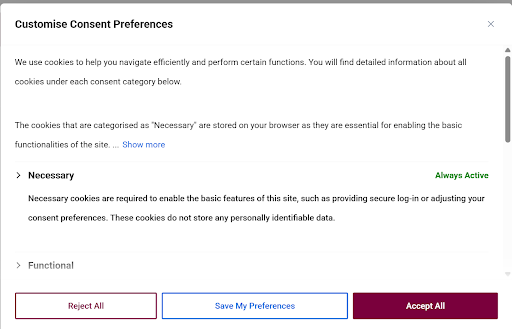
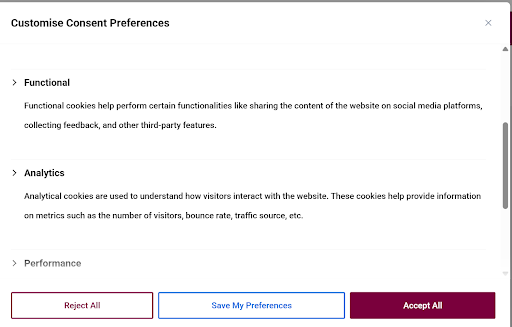
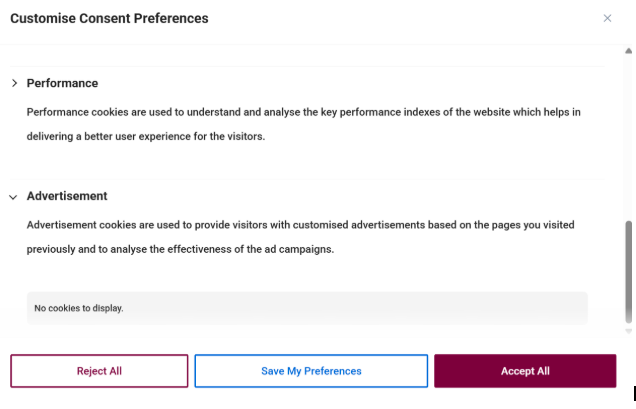
As of the date of these Instructions, the Cookie Preference Center is displayed on the website as demonstrated in the following screenshots. Note that the user has the ability to view cookies per Cookie Category.
Update the Cookie Preference Center to use the following explanatory language and design:
Cookie Preference Center This website uses cookies, pixels, beacons, APIs, and other similar technologies (“Cookies”), including third-party technologies, that process data (e.g., IP address) to function for various purposes, such as to provide services requested by you, support website functionality, conduct analytics, combat fraud, and facilitate marketing. Some Cookies are always active and cannot be disabled, including Cookies we use for providing functionality necessary for services you request, security, fraud prevention, maintaining your cookie preferences, and complying with applicable law. All other Cookies are Optional. You may “Accept Optional Cookies” or “Reject Optional Cookies.” You may also use the toggles below to accept or reject Optional Cookies based on their general purpose. Once you set your preferences, select “Confirm My Choices.” Rejecting Optional Cookies may limit your experience. You can access the cookie preferences center by clicking the “Manage Cookies” link in this website’s footer. Your access or use of this website is subject to Privacy Policy and Terms of Use. |
Always Active Cookies |  |
Performance Cookies | |
Functional Cookies | |
Analytics Cookies | |
Advertising Cookies | |
Social Media (Functional and Advertising) Cookies | |
| | | |
Reject Optional Cookies | | Accept Optional Cookies | | Confirm My Choices |
The Cookie Preference Center must function as follows:
- All toggles should be OFF by default until a user makes changes.
- There should not be an “X” to close out the Cookie Preference Center.
- The “Privacy Policy” link should go to the respective website’s Privacy Policy.
- The “Terms of Use” link should go to the website’s Terms of Use.
- If the user clicks “Reject Optional Cookies” all the toggles should be disabled.
- If the user clicks “Accept Optional Cookies” all the toggles should be enabled.
- The specific cookies categorized under each category should NOT be displayed.
- Technical changes to cookies to respect the user’s choices should not occur until after the user clicks the “Confirm My Choices” button.
- The Cookie Preference Center should not disappear until the visitor clicks the “Confirm My Choices” button.
5. Website Footer Link
The footer of the website must display a link allowing users to access the Cookie Preference Center.
As of the date of these Instructions, the website displays an icon shaped like a cookie in the bottom left of the website that opens the Cookie Preference Center (see screenshot below).
If possible, remove the CookieYes cookie-shaped icon; and instead add a footer link titled “Manage Cookies” that opens the Cookie Preference Center.
6. Cookie Management Maintenance
The following are instructions for maintaining of the cookie management tool:
- Ensure the cookie management tool is logging visitor consents in a format that can be exported for auditing or other legal compliance purposes.
- Conduct quarterly technical testing to ensure that the cookie management tool is functioning properly with the websites and technologies involved.
- If DLZ becomes aware of any cookies running on the website that are not captured by the cookie scan, DLZ should take appropriate steps to categorize these cookies as explained in Cookie Scanning above. If there is any confusion as to how to categorize a specific cookie, contact Legal for further instructions.